
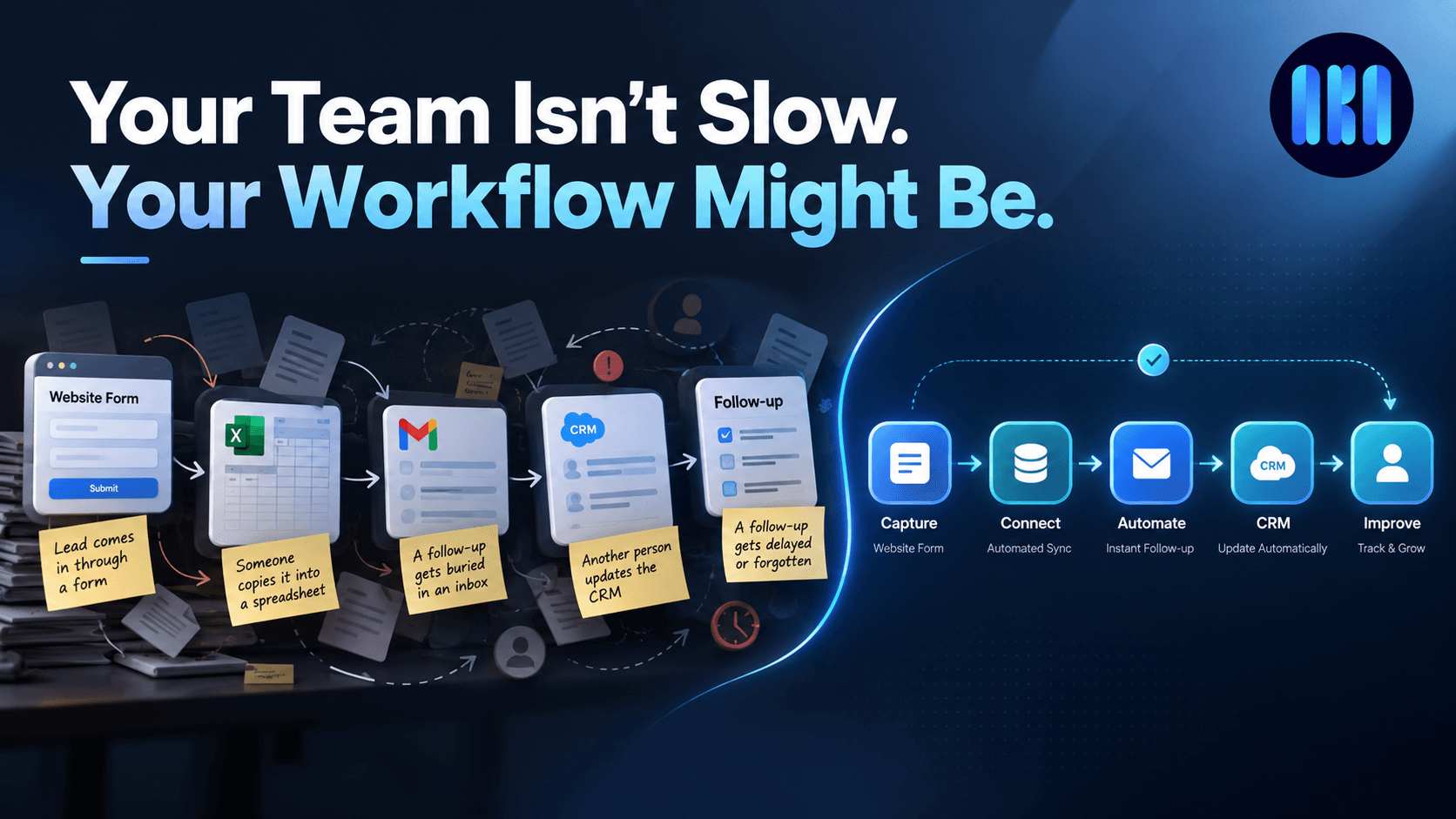

Your Team Isn’t Slow. Your Workflow Might Be.
A business can have good people and still feel painfully slow.
A lead comes in through a website form. Someone checks the notification and copies the details into a spreadsheet. Later, another person moves that information into the CRM. Someone else is supposed to follow up, but the email gets buried between everything else happening that day.
A few days later, the customer calls again.
They have to explain the problem from the beginning.
Nobody intentionally designed the business to work this way. It usually happens gradually.
One tool gets added for leads. Another gets added for communication. A spreadsheet is created because it’s quick and familiar. Then another tool is introduced to solve a completely different problem.
Eventually, the business has plenty of software—but the work between those tools is still being done by people.
And that’s where the real problem starts.
The Hidden Cost of Disconnected Workflows
Manual work doesn’t always look expensive.
Copying a name from one system to another might take 30 seconds. Updating a spreadsheet might take a minute. Sending one follow-up email might take two minutes.
But multiply that by hundreds of leads, customers, requests, invoices, tickets, or internal tasks every month.
Now you’re not looking at a few minutes.
You’re looking at hours of work that could have been handled automatically.
And the cost isn’t only time.
Manual handoffs create opportunities for:
• Information being entered incorrectly
• Tasks being forgotten
• Follow-ups happening too late
• The same information being entered multiple times
• Teams working with outdated data
• Customers having to repeat themselves
The frustrating part is that these problems often don’t show up as one big failure.
They show up as dozens of small inefficiencies throughout the day.
More Tools Don’t Necessarily Fix the Problem
It’s tempting to think the solution is another piece of software.
Sometimes it is.
But adding another tool to an already disconnected workflow can make things worse.
The better question is:
How does information move through the business?
Where does a request start?
Who needs to see it?
What happens next?
What information needs to be transferred?
Which steps actually require a person?
And which steps are simply being done manually because nobody has connected the systems yet?
Once you look at the workflow this way, the opportunities for improvement become much easier to see.
Start With the Workflow, Not the Technology
A good automation doesn’t begin with:
“Which software should we use?”
It begins with
“What are we doing repeatedly that doesn’t need to be done manually?”
For example, imagine a customer submits a form.
Instead of:
Form → Email → Spreadsheet → Person → CRM → Follow-up
The process could become:
Form → CRM → Assignment → Notification → Follow-up → Customer Update
The information is captured once and carried forward automatically.
The team doesn’t have to remember every step.
They can spend their time on the parts of the process that actually need human judgment.
That’s what useful automation should do.
It shouldn’t try to replace your team.
It should remove the unnecessary work surrounding them.
A Simple Way to Think About I
At AKA Innovations, we think about business workflows in three stages:
Capture → Connect → Improve
Capture
Get information into the right system without unnecessary manual entry.
Connect
Make the tools and systems involved in the process communicate with each other.
Improve
Look at what still causes delays, identify bottlenecks, and keep refining the workflow.
The goal isn’t to automate everything.
The goal is to make work move naturally from one step to the next.
Where Should You Start?
You don’t need to automate your entire business at once.
Start with one process that happens frequently.
Maybe your sales team spends hours updating leads.
Maybe customer requests are coming through WhatsApp, email, and forms with no central record.
Maybe your employees repeatedly copy information between systems.
Maybe someone has to manually prepare the same report every week.
Pick one.
Map out what happens from beginning to end.
Then ask one simple question at every step:
Does this actually need a person?
You may find that some steps do.
That’s fine.
The point isn’t to remove people from the process. It’s to remove the work that people shouldn’t have to keep repeating.
Better Workflows Make Better Businesses
Your team might not need another productivity tool.
They might not need another meeting.
And they probably don’t need to be told to work faster.
They may simply need a better way for work to move through the business.
At AKA Innovations, we help businesses identify these gaps, connect the systems they already use, automate repetitive processes, and build digital workflows around the way their teams actually work.
If your team is spending too much time moving information between tools, tell us what your current workflow looks like. We can help you find where the friction is.